Skip to Content

System Integration

Business-System Integration is about connecting Y Intelligence to the systems, data sources, and operational tools your business already uses.

This may include ERP systems, CRM platforms, finance systems, inventory databases, support tools, spreadsheets, shared folders, internal portals, workflow platforms, or custom-built business applications.

Instead of Y only answering from static documents, Business-System Integration allows it to retrieve live information, check records, support processes, and trigger approved actions across the organisation’s existing technology environment.

The important point is that Y does not require a business to be perfectly digitised before it can create value. It can work with the reality of the business today, whether key information sits in Excel spreadsheets, databases, legacy systems, or enterprise platforms.

Book a Demo 

A user asks Y a question in plain language, and Y searches approved company knowledge and connected systems to return a clear, context-aware answer without the user needing to know where the information lives.

AI in Action
Knowledge Management

The Pain Point

Important information is often spread across disconnected systems, spreadsheets, databases, and manual processes.

Many organisations have important business information spread across multiple systems.

A customer record may live in the CRM, stock information may sit in the ERP, pricing logic may be managed in spreadsheets, invoices may sit in finance software, and operational updates may be tracked manually by different teams.


This creates major problems:

  • Staff need to log into multiple systems to answer one question.
  • Customers wait while teams manually check information.
  • Data is duplicated across spreadsheets and platforms.
  • Teams rely on manual lookups and back-office support.
  • Frontline staff do not always have access to the systems they need.
  • Processes become slow because information is fragmented.
  • People make decisions based on outdated or incomplete data.
  • Routine requests are escalated simply because the information is hard to retrieve.
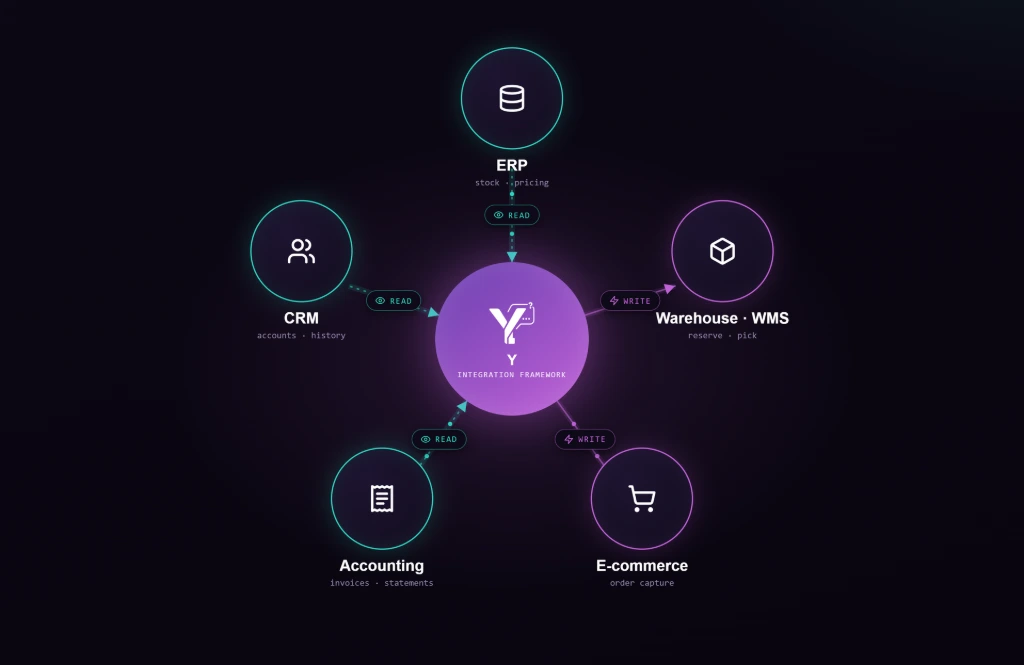
The issue is not always that the business lacks systems. The issue is that those systems are often disconnected from the people and processes that need them most.

What Y Offers

Y creates a bridge between people, business knowledge, live information, and operational systems.

Y Intelligence creates a bridge between people, knowledge, and business systems.

It allows users to ask questions or make requests in natural language, while Y retrieves the relevant information from approved systems or data sources in the background.

A user can ask:

“What is this customer’s current order status?”

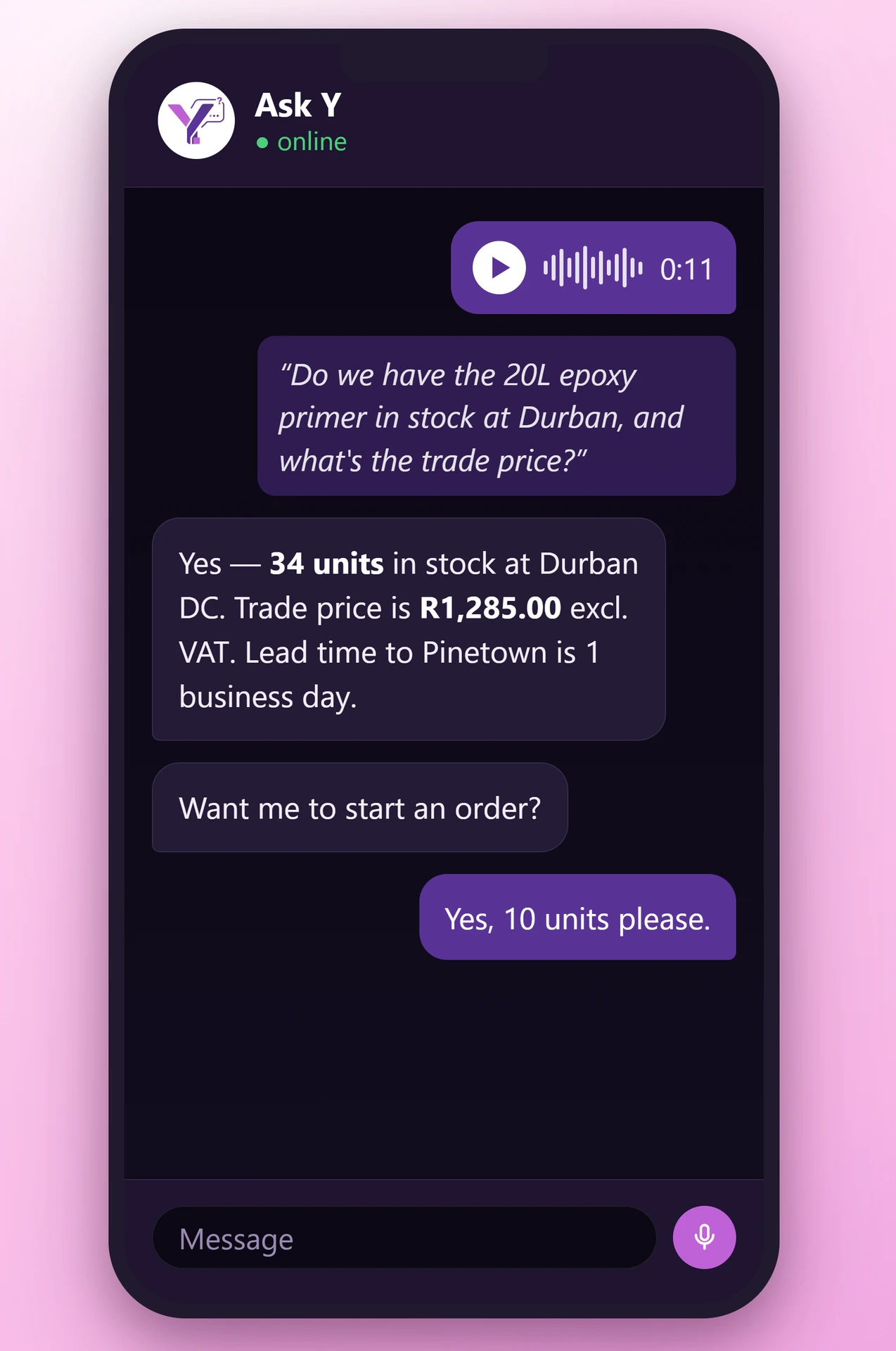
“Do we have stock available at the Durban branch?”

“What invoices are overdue for this account?”

“What is the latest pricing for this product?”

“Can you create a support task for this issue?”

Y can then check the relevant source, return the answer, guide the user through the next step, or trigger a controlled action where the process allows it.

This allows the business to move from manual system checking to a more connected intelligence layer that makes systems easier to use.


How it Works

Y connects to approved systems, retrieves information, interprets it, and triggers controlled actions where allowed.

Y can connect to business systems in different ways depending on the maturity and structure of the organisation.

This may include:

  • API integrations with ERP, CRM, finance, inventory, or support systems
  • Database connections for approved read-only or controlled access
  • Spreadsheet-based data sources where processes still live in Excel
  • Document repositories and shared folders
  • Internal portals or custom applications
  • Workflow tools and task management systems
  • Reporting databases or operational dashboards

Y can be configured to retrieve information, interpret it in context, and present it in a simple answer.

Where appropriate, it can also trigger actions, such as:

  • Creating a task
  • Sending a notification
  • Logging a support request
  • Escalating an issue
  • Updating a workflow status
  • Starting an approval process
  • Routing a request to the correct team

Access and actions can be governed by user role, department, permission level, customer type, or agreed business rules. This ensures that Y only shows information or performs actions that the user is allowed to access.


Why it Matters

Users get live business information faster without switching systems or relying on specialist users.


.

Business-System Integration matters because most operational delays happen between systems, not inside them.

The information may exist, but people still need to find it, interpret it, move it between places, or ask someone else to check it.

By connecting Y to business systems, organisations can make live information easier to access and routine actions easier to complete.

This improves:

  • Speed of response
  • Operational efficiency
  • Customer service
  • Sales support
  • Finance follow-up
  • Inventory visibility
  • Internal support processes
  • Process consistency
  • Data accessibility

It is especially valuable in businesses with multiple branches, distributed teams, customer-facing staff, stock movements, finance workflows, order tracking, or legacy processes still managed through spreadsheets.

Example Use Cases

Users can check stock, pricing, orders, invoices, approvals, tickets, reports, or customer records.


“Do we have this product in stock, and what is the customer price?”

Angela
Sales Representative - working and asking within the CRM

Y pulls stock availability from the ERP system and pricing from the approved pricing source, then returns a single, consolidated answer directly within the CRM interface, without the sales representative needing to switch systems.


“What is the current status of this customer’s order?”

Jim
Customer Service Agent - Handling query in the Support Platform

Y retrieves the order status from the order management or ERP system and displays it within the support tool, allowing the agent to respond immediately without logging into a separate system.


“Which invoices are overdue for this customer?”

Siphiwe
Finance Staff Member - Working in the Finance Dashboard

Y accesses the finance database, retrieves the relevant invoice data, and presents the overdue amounts, dates, and status in a clear format within the user’s working environment.


“Can you log a ticket for this issue and assign it to the right team?”

Thandiwe
Support Team Member - Using the Ticketing System

Y captures the request, structures the required fields, and creates the ticket directly in the support system, assigning it based on predefined routing rules.


“What branches have the most unresolved stock queries this week?”

Jonothan
Manager - Reviewing Operational Performance

Y aggregates data from the relevant reporting or operational systems and presents a summary view, helping the manager identify trends without manually compiling reports.


“Who should approve this customer exception?”

Rob
Frontline Employee - Working in the Internal Portal

Y checks the approval rules stored in the workflow or policy system and guides the employee to the correct approver, or initiates the approval process directly within the workflow tool.

Business Impact

Y reduces manual lookups, improves response times, and makes existing systems easier to use.

Business-System Integration creates value by reducing the manual effort required to access and act on business information.

It helps businesses

  • Reduce time spent switching between systems
  • Improve access to live operational information
  • Reduce manual lookups and repetitive internal requests
  • Support faster customer and staff responses
  • Make existing systems easier to use
  • Connect spreadsheet-based processes into smarter workflows
  • Reduce dependency on specialist system users
  • Improve consistency in how actions are triggered
  • Create a foundation for automation and operational intelligence
This capability is powerful because it allows Y to work with the business as it exists today. Whether the process is managed in Excel, an internal database, a legacy application, or a full enterprise system, Y can help make that information more accessible and useful.

Website Positioning

Y connects to your existing systems so users can access live information and act on it more easily.

Business-System Integration connects Y to the systems and data your business already uses, from Excel spreadsheets and shared folders to ERP, CRM, finance, inventory, and operational platforms.

Y helps users retrieve live information, follow guided processes, and trigger approved actions without needing to know which system holds the answer.